Text in images is a tax you pay forever
Text in images looks finished on launch day. After that, every change to the words is a design job, and the words cannot be read aloud, translated, tested or zoomed.
In this piece
Text in images looks finished on launch day. After that, every change to the words costs a designer, an export and an upload, and the words can't be read aloud, translated, tested or zoomed. That's the tax, and you pay it every time the copy moves.
Real text costs one field edit. That's the whole argument. The rest is the bill.
What counts as text in images?
Any word that lives inside the pixels instead of the page. A headline set in Canva or Figma and exported as a JPG. A “20% off” badge painted onto a product photo. A price, a star rating, a bestseller ribbon, a comparison chart saved as a PNG.
The quick test is your cursor. Try to highlight the words. If you can't select them, they're pixels.
What does the tax actually cost?
6 line items. Each one is small, and none of them expires.
- Every edit is a design job. Changing one word takes the source file, someone who can open it, an export, an upload and a fresh alt text. That's 5 steps for one word.
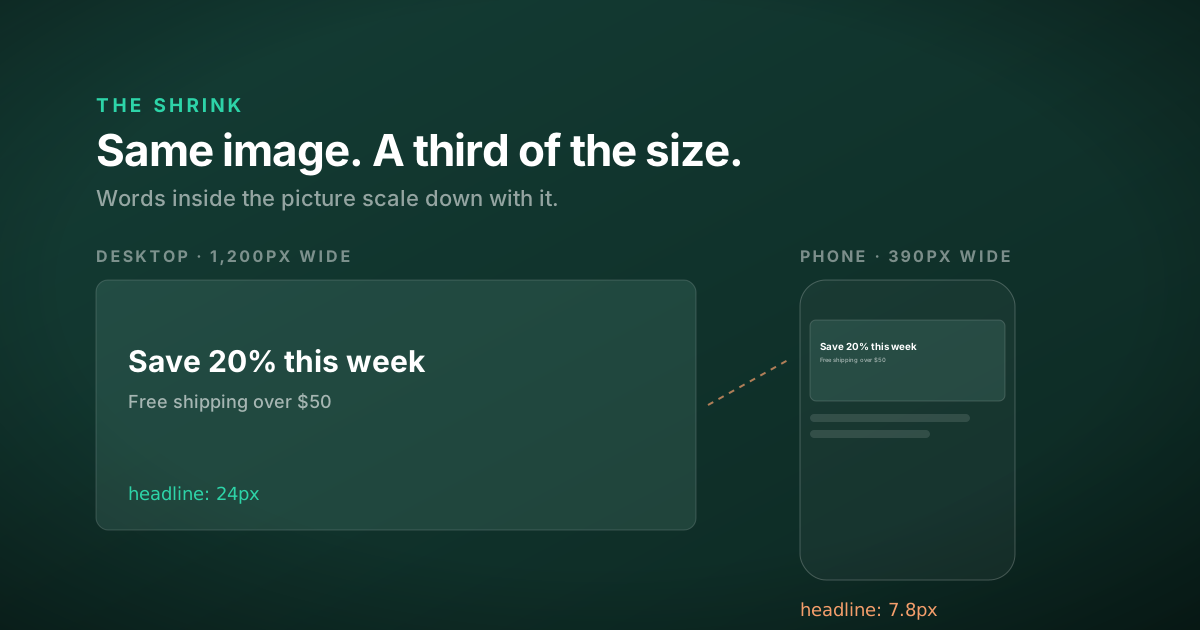
- Phones shrink it. Type scales with the picture. A 24px headline inside a 1,200px-wide image renders at 7.8px on a 390px-wide phone screen. It was designed to be read at 24px.
- Screen readers only get the alt text. So the words exist twice, once in the pixels and once in the alt, and the two drift apart. That's the kind of contradiction a product page audit should catch.
- Translation skips it. Translation tools translate text. An image needs a new export for every language, or it stays in English on your French storefront.
- Tests get expensive. Testing two headlines in an image means making two images. Testing live text means typing a second headline.
- Machines read the page, not the picture. Some search tools can pull text out of an image. Relying on that means hoping a machine reads your price correctly, when you could just tell it.
What happens when the numbers change?
Recently I wrote a rebuild brief for a direct-to-consumer store. Its hero photo had 2 claims inside the picture, a per-day price and a “value” figure for the bundle.
The bundle had changed since the photo was made. So the value figure was out of date, and it was out of date in two places, a text badge and the photo.
The badge was a one-pass fix. The photo wasn't. The brief's answer was a re-export with no text, and if that couldn't arrive in time, a crop with the claims set in live type.
Neither fix is hard. Both cost more than editing a field, and both only exist because the words went into the picture in the first place.
It was unreadable on a phone as well. The tax usually arrives in more than one line at a time.
How do you find text in images on your site?
Four checks. You can run all of them on your homepage in about 10 minutes.
- Try to highlight every headline, price and badge with your cursor.
- Zoom your browser to 200%. Real text stays sharp. Pixels go soft.
- Open the page on your phone and read each image without pinching to zoom.
- Read the alt text on each hero image. If it repeats a sentence word for word, that sentence is probably baked in.
Anything that fails goes on a list. Start with the images that carry a price or a promise, because those are the words that change.
What should you use instead?
Put the words on top of the picture, not inside it.
On Shopify, the Image banner section in Dawn already has heading, text and button blocks that sit over the image. If your theme is built on Dawn, the section is already there. If it isn't, it's one of the first sections worth asking a developer for, and it ties back to what makes a Shopify theme easy to change.
Badges and ribbons belong in a theme setting or in CSS, not in a new PNG every time the offer moves.
Charts and diagrams can be drawn as SVG with real text inside, which is how the graphics on this blog are made. There's a trade-off, though. An SVG loaded as an image isn't part of the page's text, so I still write full alt text for each one.
When is text in images fine?
More often than the rule makes it sound. The W3C's WCAG 2.2 success criterion 1.4.5, Images of Text, asks for real text wherever the technology can do the job. It carves out an exception when a particular presentation is essential, and it says plainly that “logotypes” count as essential.
- Your logo. The shape of the words is the point.
- Product photos with words on the packaging. The label is the product.
- Share cards. A social preview is an image by definition. The card for this post is text in an image, and that's fine. To see how yours looks in each app, use the Open Graph Checker.
- Screenshots used as evidence. A picture of a real dashboard proves something that retyped numbers can't.
The test for everything else: is the picture of the words the point, or just the words? If it's just the words, set them as text. My free Findability Check looks at whether your images carry alt text. It can't tell you whether the words belonged in the picture at all. That call is still yours.
One question
Look at the image at the top of your homepage. How many words are inside it?
And when did anyone last change them?
Questions people ask
What counts as text in images?
Any word that lives inside the pixels instead of the page. A headline designed in Canva or Figma and exported as a JPG, a discount badge painted onto a product photo, a price, a star rating, or a chart saved as a PNG. The quick test is to try to highlight the words with your cursor. If you cannot select them, they are part of the image.
Why is text in images bad for a website?
Every change to the words becomes a design job, with a source file, an export, an upload and new alt text. The words shrink with the image on a phone, so a 24px headline in a 1,200px image renders at 7.8px on a 390px screen. Screen readers only get the alt text, translation tools skip it, and testing a new headline means making a new image.
When is it fine to put text in an image?
When the look of the words is the point. WCAG 2.2 success criterion 1.4.5 asks for real text where the technology allows it, with an exception for presentations that are essential, and it counts logotypes as essential. Product photos with words on the packaging, social share cards and screenshots used as evidence are also reasonable uses.
How do I put text over an image in Shopify?
Use a section that places live text on top of the image rather than inside it. The Image banner section in Shopify’s Dawn theme has heading, text and button blocks for this, so the words stay editable in the theme editor. If your theme has no equivalent, it is one of the first sections worth asking a developer for.