Measure website changes, or you didn't improve them
To measure website changes, you need the number from before the change. That is the only part of the measurement with a deadline, and it is the easiest part to skip.
In this piece
To measure website changes, write the number down before you touch anything. Without a before, “it's better now” is an opinion. It might be a correct opinion. You just can't prove it, to your team or to yourself.
It's an easy step to skip. Not out of laziness. The change feels obviously good, so measuring it feels like paperwork.
Why does the baseline matter more than the change?
Because you can make the change again. You can't go back and take the before.
Memory is a poor record. Ask three people for the conversion rate before last month's redesign and you may get three answers. And some of the tools you'd check only hold a window of history.
- PageSpeed Insights. Its field data reports real users over the previous 28-day collection period. After a fix, the old number rolls out of view. If you didn't save it, it's gone.
- Google Search Console. Performance data goes back 16 months, which is why Google's own guide to debugging traffic drops tells you to pick “Last 16 months” to rule out a seasonal dip. Anything older has to have been exported.
- Google Analytics 4. Standard reports aren't affected, but explorations and funnel reports only reach back as far as your retention setting, which is 2 months or 14 months on a standard property.
The before is the only part of the measurement with a deadline. The after will wait for you.
What should you record before you change a page?
5 things. It takes about 10 minutes, and it fits in one note.
- The one number the change is meant to move, with the date range you read it over. One number, not a dashboard.
- A screenshot of the page as it is. You'll want to see what you changed, not just the result.
- The tool and its settings. Mobile or desktop, which date range, which filter. A number with no settings can't be compared with anything.
- What else is happening that week. An email send, an ad push, a holiday, a price change. These move numbers too.
- The date you'll check again. Pick it now, so you don't check on the first good day.
What does this look like on a real page?
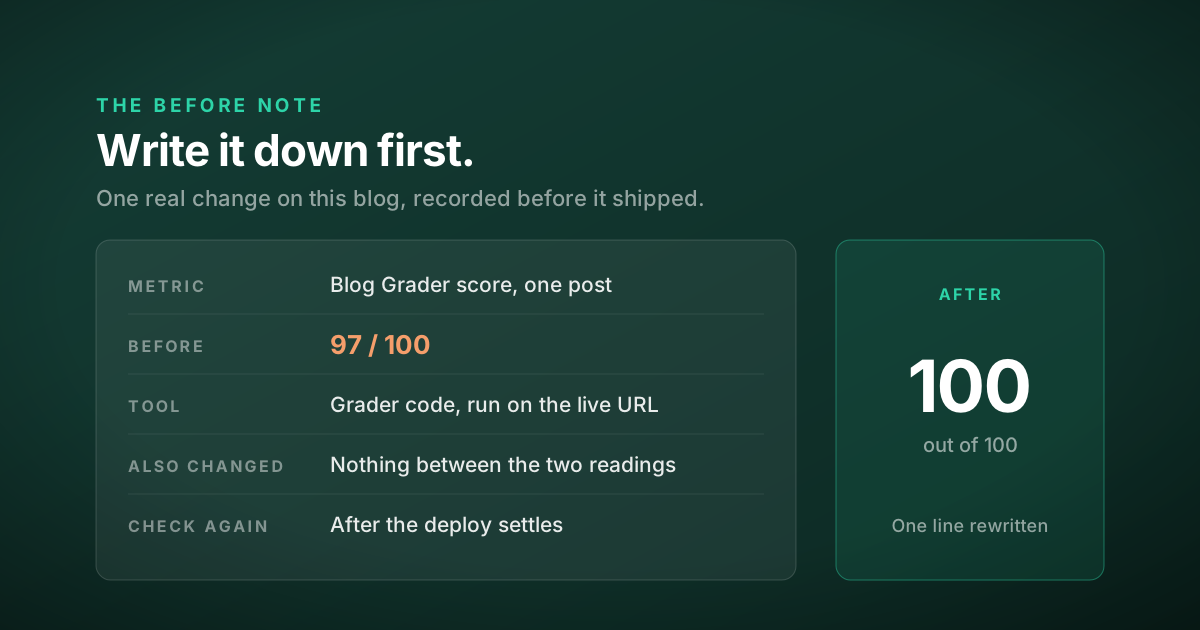
Small, usually. This week I added posts to this blog and reworked an earlier one, and I graded each one with the Blog Grader I built for Blog Hands, before and after every change.
The first post scored 97 out of 100. The grader read the short line under the title as the opening paragraph, and that line didn't contain the post's topic. I rewrote it and graded again. 100. The product page audit post went from 96 to 100 the same way. Each lost point came with the grader's reason attached.
Then one reading came back at 26 out of 100. The grader had fetched the homepage, because the new deploy hadn't finished settling. I graded again shortly after and got 100.
The 26 was a real number. It just wasn't a number about my page. That's the other half of measuring: check that you measured the thing you changed before you believe the result, whichever way it points.
How long should you wait before you measure again?
It depends on where the number comes from.
- Lab tools like Lighthouse, or a grader, re-run in seconds. Measure right after the change goes live.
- Field data like the Chrome UX Report behind PageSpeed Insights needs its 28-day window to fill with the new version.
- Search performance moves slowly. Compare matching date ranges, and use a long enough range that one odd week can't decide it.
- Sales and sign-ups need enough visits that a single good day can't swing the result. On a small store that can take weeks.
If you want a quick before for how machines read a page, my free Findability Check gives you a score you can save. For how you compare to rivals, the Authority Check gives you a report you can save as a PDF. Save it, make the change, then run it again.
When is measuring not worth it?
Fixing a typo, a broken link or a wrong phone number is correct on its face. Just fix it. The exception is anything you're changing because you think it will perform better. That's a prediction, and a prediction needs a before.
There's a harder limit, though. A number that goes up after a change doesn't prove the change caused it. The season, an email, or a competitor running out of stock can all move it. The baseline doesn't remove that doubt. It makes it visible, which is more honest than a confident guess.
And on a low-traffic page, the numbers may not settle for months. In that case, measure something closer to the change, like whether people can find the thing you moved, rather than waiting on sales.
One question
Think of the last change you made to your site that you'd call an improvement.
What was the number before?
Questions people ask
How do you measure website changes?
Record a baseline before you change anything. Write down the one number the change is meant to move and the date range, take a screenshot of the page, note the tool and its settings, list anything else happening that week, and pick the date you will check again. Then compare the same number, with the same settings, after the change.
Why do I need a baseline before changing my website?
Because you can repeat a change but you cannot go back and take the before. Some tools only hold a window of history. PageSpeed Insights field data covers the previous 28 days, Search Console performance data goes back 16 months, and GA4 explorations only reach back as far as the retention setting of 2 or 14 months on a standard property.
How long should I wait before measuring a website change?
It depends on the source. Lab tools like Lighthouse can be re-run as soon as the change is live. PageSpeed Insights field data needs its 28-day window to fill with the new version. Search performance and sales need long enough date ranges that one unusual week or one good day cannot decide the result.
Does a better number prove my change worked?
Not on its own. The season, an email send, an ad campaign or a competitor running out of stock can all move the same number. A baseline does not remove that doubt, but it makes it visible, and it lets you check that you measured the page you actually changed.